Anthony Buczynski, CEO - Greenhat Services
Reference and to view full article - Click here
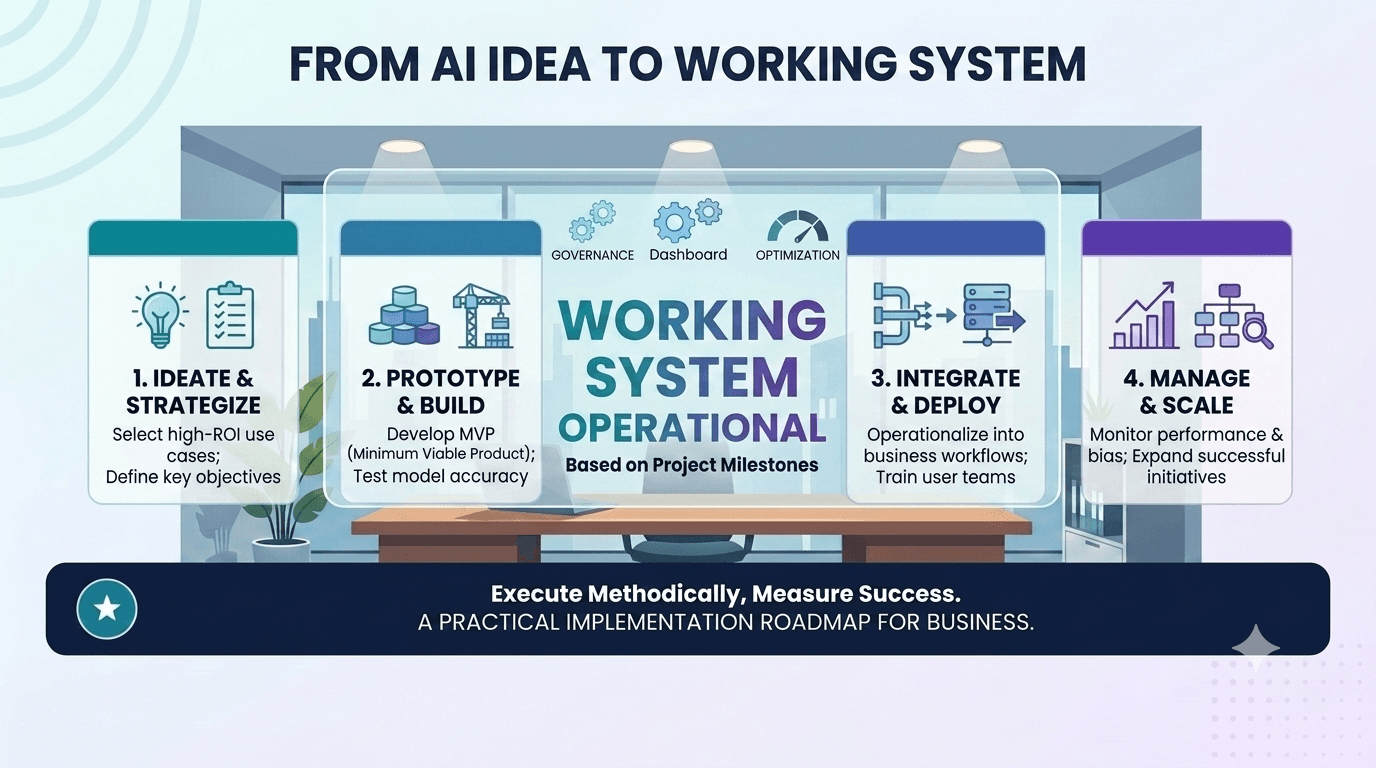
Many businesses now know they want to use AI. Fewer know exactly where it should be used, what workflow it should improve, which systems it needs to access, which decisions it should make, and where human review is still required.
That gap is where many AI projects become expensive experiments.
The issue is rarely that the AI model is not powerful enough. More often, the issue is that the business has not clearly defined the workflow it wants AI to improve. The process is unclear, exceptions are handled informally, data lives in multiple systems, approval rules are undocumented, and the team has different views of how the work actually happens.
AI workflow design solves this problem.
Before choosing tools, building agents or implementing automations, businesses need to understand the process. That means mapping the people, systems, data, decisions, handovers, approvals, exceptions and outputs involved in the workflow.
For mid-sized and large organisations, this is especially important. AI implementation is not simply a technology decision. It is an operational design decision.
This article explains why AI workflow design should come before AI implementation, how process mapping improves ROI, and how businesses can design AI-enabled workflows that are practical, secure and commercially valuable.
AI workflow design is the process of mapping, redesigning and implementing business workflows so AI can perform useful tasks within clear operational boundaries.
In simple terms, it answers questions such as:
AI workflow design is not the same as choosing an AI tool. It comes before tool selection.
A business may eventually use an AI agent, workflow automation platform, custom application, API integration, dashboard, cloud service or off-the-shelf AI product. But the technology should be selected after the workflow is understood.
Without workflow design, AI implementation can become disconnected from real business operations. The business may automate the wrong step, introduce new risks, duplicate existing work, or build something staff do not trust or use.
Good AI workflow design makes the work visible before the technology is built.
AI projects often fail because they begin with a tool instead of a workflow.
A leadership team may decide to “implement AI” after seeing a demonstration, using ChatGPT internally, attending a conference, or responding to pressure from competitors. The business then starts looking for software, agents or automation platforms before clearly defining the operational problem.
That creates several common issues.
Many workflows are not formally documented. Staff know how work gets done, but the process may rely on experience, informal workarounds, inbox habits, spreadsheets, manual checks and undocumented judgment.
If the workflow is unclear, AI has no stable process to improve.
For example, a finance team may say it wants to automate invoice processing. But the real workflow may include supplier validation, purchase order matching, cost centre approval, duplicate detection, exception handling, budget review, payment scheduling and escalation to managers.
If these steps are not mapped, an AI solution may only address document extraction while leaving most of the operational burden untouched.
A business may assume that the problem is content generation, ticket response, invoice reading or data entry. But the real issue may be approval bottlenecks, poor system integration, inconsistent decision rules, missing data, duplicate systems or unclear ownership.
AI workflow design helps identify the actual constraint.
For example, a customer service team may think it needs an AI chatbot. But process mapping may reveal that the real issue is slow escalation between support, operations and finance. In that case, an AI triage and routing workflow may create more value than a customer-facing chatbot.
AI systems need context. They need access to reliable data, defined rules, current documents, appropriate permissions and clear review requirements.
If workflow design is skipped, the AI may generate plausible but incomplete outputs. Staff then spend time checking, correcting or ignoring the system.
This reduces adoption and weakens ROI.
Most business processes are not made up of neat, repeatable cases. They include exceptions.
Examples include:
AI workflow design identifies which exceptions can be handled automatically, which need escalation, and which should remain fully human-managed.
Enterprise AI is rarely useful in isolation.
To create real operational value, AI often needs to connect with CRMs, ERPs, LMSs, finance systems, help desks, databases, document repositories, inboxes, dashboards and workflow tools.
If the workflow is not mapped, integration requirements are often discovered too late. This can increase project cost, delay implementation and reduce the usefulness of the system.
If the original workflow was not measured, it becomes difficult to prove improvement.
AI workflow design creates a baseline. It helps the business understand how much time the process currently takes, where errors occur, where delays happen, how many exceptions arise, and what each step costs.
Without that baseline, ROI becomes anecdotal.
Tool selection should be a response to workflow requirements, not the starting point.
A business may be able to use an off-the-shelf AI tool for simple use cases such as drafting, summarisation, meeting notes or basic research. But for operational workflows, the right solution depends on the process.
Process mapping helps determine whether the business needs:
The table below shows how workflow clarity affects technology selection.
| Repetitive rules-based task | Traditional automation may be enough |
| High-volume document review | AI classification, extraction or summarisation may help |
| Multiple systems involved | API integrations or middleware may be required |
| Sensitive decisions | Human-in-the-loop approval is needed |
| Frequent exceptions | Escalation rules and exception handling must be designed |
| Poor reporting visibility | Dashboard or business intelligence layer may be required |
| Legacy systems involved | Custom integration or data access strategy may be required |
| Compliance requirements | Logging, permissions and audit trails become essential |
In other words, the workflow tells the business what to build.
A tool-first approach asks, “What can this technology do?”
A workflow-first approach asks, “What business process are we improving, and what technology is required to improve it safely and measurably?”
For established businesses, the second question is far more useful.
Effective AI workflow design requires more than drawing a simple process diagram.
A useful map should show how work actually moves through the business. It should include formal steps, informal workarounds, data sources, approval rules, system handovers and failure points.
Start by identifying everyone involved in the workflow.
This may include:
People matter because AI implementation often changes responsibilities. It may reduce manual work, but it can also create new review, monitoring or exception-handling roles.
Next, map the systems involved.
These may include:
For enterprise AI, disconnected systems are often one of the biggest barriers to useful implementation. AI may need to read from one system, write to another, trigger a workflow in a third, and report outcomes in a dashboard.
AI workflow design should identify what data is needed at each step.
This includes:
It should also identify whether the data is structured or unstructured.
Structured data is usually stored in defined fields, such as customer records, invoice amounts or status codes. Unstructured data includes emails, PDFs, call notes, contracts, policies and support conversations.
AI can be especially useful when workflows involve high volumes of unstructured information, but only if data access, permissions and validation are designed properly.
Many workflows involve decisions, even if they are not formally described as decision points.
Examples include:
Some decisions can be automated. Others should be supported by AI but approved by humans. Some should remain entirely human-led.
Mapping decision points is essential for safe AI implementation.
Exceptions are where many automation projects break.
A good AI workflow design process identifies:
For example, an AI agent may be able to classify most customer support tickets. But if a ticket includes a legal threat, safety issue, high-value customer complaint or unusual refund request, the workflow should escalate it to a human.
Exception handling is not a minor detail. It is a core part of enterprise AI design.
AI workflow design usually requires two maps: the current state and the future state.
The current-state workflow shows how the process works today.
It should capture:
The goal is not to create a perfect theoretical diagram. The goal is to understand operational reality.
This often requires speaking with the people who do the work, not just the people who manage the work.
The future-state workflow shows how the process should work after AI implementation.
It should define:
The future-state workflow should be practical. It should not assume that AI will remove all human involvement.
In many enterprise settings, the best outcome is not full automation. It is a better division of labour between people, software and AI.
One of the most important parts of AI workflow design is defining automation boundaries.
An automation boundary describes what the AI system is allowed to do, and what it is not allowed to do.
This matters because AI is not equally appropriate for every task.
AI may be useful for:
Human approval is often needed for:
AI may not be appropriate where:
AI workflow design helps identify these boundaries before implementation begins.
This protects the business from over-automation.
Human-in-the-loop AI is essential for many enterprise workflows.
A human review point is a defined step where a person checks, approves, edits, rejects or escalates an AI-generated output or recommendation.
Human review should not be vague. It should be designed into the workflow.
Review points may be required when:
For human review to work properly, staff need clear information.
A review screen or workflow task should ideally show:
The goal is not simply to insert a human as a rubber stamp. The goal is to give the reviewer enough context to make a better decision faster.
Human review points increase trust.
Staff are more likely to use AI systems when they understand where AI assists, where humans remain accountable, and how errors can be corrected.
This is especially important in businesses with compliance obligations, complex customer relationships, professional services delivery or high operational risk.
A mid-sized business receives hundreds of customer support enquiries each week through email, website forms and a help desk platform. The team manually reads, categorises, prioritises and routes each ticket.
The current workflow has several issues:
The business initially considers adding a chatbot. But process mapping shows that the larger problem is not the lack of a chatbot. It is triage, routing, escalation and reporting.
A better future-state workflow may include an AI support triage agent that: